


Private cloud vs. public cloud: Which is right for your business?
Are you deciding between private cloud and public cloud for your business? You’re not alone. With the rapid evolution of cloud computing, it’s crucial to understand the differences between public and private cloud solutions to make an informed decision that suits your organization’s needs.

What is a private cloud?
Imagine having your own exclusive, on-demand infrastructure and resources tailored to your organization’s specific requirements. That’s precisely what a private cloud can offer.
Organizations that use private cloud services have the advantage of dedicated resources and enhanced security. This is in contrast to public cloud deployments, where resources are shared and managed by third-party providers.
Definition of a private cloud
A private cloud is a cloud computing environment reserved for a single customer or organization. It provides:
- Dedicated resources
- Increased control and customization
- Scalability
- Security, allowing organizations to tailor the cloud environment to suit their specific needs and requirements.
Features
Private cloud primarily features:
- Dedicated resources: resources exclusively assigned to a single user or organization and not shared with any other user or organization
- Adaptable infrastructure: infrastructure that can be easily customized and scaled to meet specific needs
- Enhanced security: increased security measures to protect cloud data privacy
Customizable infrastructure means the ability to tailor the cloud environment to meet the requirements of the user or organization, encompassing hardware, operating system, and software selection.
Enhanced security ensures data protection through encryption, authentication, and other security measures regulating access to the cloud environment.
Advantages of using a private cloud
Employing a private cloud provides numerous advantages, including heightened control, customization, and security, with greater control over data governance and data locality, more flexibility, and more scalability compared to public clouds. Private clouds provide improved privacy due to enterprise authentication and enable organizations to have their exclusive, on-demand infrastructure and resources, allowing them to tailor the environment to meet their specific requirements while maintaining a higher level of security compared to public cloud services.
Disadvantages of using a private cloud
On the flip side, private cloud can come with some drawbacks, such as:
- Increased expenses
- The need for internal expertise
- Maintaining your hosting infrastructure and managing resources can lead to higher costs and more intricate management compared to public cloud services.
Private vs. public cloud for regulated industries
Regulated workloads require a closer look at the specific cloud service, its configuration, and the responsibilities retained by your organization. Private cloud may suit workloads that need dedicated resources or customized controls, while public cloud may suit workloads supported by appropriate services and governance practices.
Healthcare and HIPAA
HIPAA permits healthcare organizations to use private, public, or hybrid cloud environments for electronic protected health information (ePHI), provided applicable requirements are met. When a cloud provider creates, receives, maintains, or transmits ePHI on an organization’s behalf, a HIPAA-compliant business associate agreement (BAA) is required. The organization must also conduct its own risk analysis; a BAA alone does not establish compliance.
Private cloud may be appropriate when healthcare applications require customized access controls or dedicated infrastructure. Public cloud may be appropriate when the selected services are covered by the BAA and configured to meet the organization’s requirements. In either model, evaluate audit logging, access management, backup and recovery, and incident responsibilities before placing patient data in the environment.
Federal government and FedRAMP
For federal workloads subject to FedRAMP, evaluate the specific cloud service offering and its assessed scope. A provider’s FedRAMP status does not automatically cover every service it sells. Agencies must also evaluate their intended use, implement customer responsibilities, and authorize their own information systems.
A private cloud deployment does not automatically satisfy FedRAMP requirements, and public cloud is not automatically excluded. Compare the services supporting the workload, the controls available for reuse, and the responsibilities the agency must operate. Dedicated infrastructure may address particular requirements, but it does not replace the applicable assessment and authorization process.
Payment card environments and PCI DSS
For organizations handling payment card data, the comparison should focus on the cardholder data environment and the controls assigned to each party. Request evidence that the provider’s PCI DSS assessment covers the services you plan to use, along with documentation identifying provider and customer responsibilities.
Private cloud may offer flexibility to design segmentation and administrative controls around payment applications. Public cloud may also support those requirements, depending on the services and architecture selected. In either environment, evaluate how access, logging, vulnerability management, and segmentation will be implemented and validated. The provider’s compliance evidence supports your assessment; it does not establish compliance for your entire environment.
What is a public cloud?

A public cloud is a cloud computing environment where a third-party provider owns and manages infrastructure shared by multiple customers. Public cloud providers such as Amazon Web Services (AWS), Microsoft Azure, and Google Cloud Platform (GCP) offer scalable, flexible, and cost-effective solutions to a wide range of organizations, delivering their services over the Internet or through dedicated connections, using a pay-per-use approach.
Public cloud providers offer infrastructure as a service (IaaS), such as compute and storage, alongside platform services and tools for databases, analytics, machine learning, and artificial intelligence.
Definition of a public cloud
Public cloud is a deployment model in which a provider offers cloud computing services to multiple customers over the internet or dedicated connections.
Public cloud offers:
- Scalability
- Flexibility
- Cost savings
Public cloud allows organizations to scale resources up or down as demand changes.
Features
The features of a public cloud include:
- Scalability: allows businesses to effortlessly adjust resources as needed
- Pay-as-you-go pricing: Organizations are charged only for the resources they utilize
- Shared infrastructure: Multiple organizations share the same physical hardware and resources
Shared infrastructure enables multiple customers to access the same resources, maximizing cost efficiency.
Advantages of using a public cloud
The benefit of using a public cloud is primarily:
- Cost savings
- Flexibility
- Straightforward deployment
- Scalability
- Simplified disaster recovery
- Staying up-to-date
- Resource availability
Moreover, public cloud users don’t have to worry about managing the public cloud computing resources themselves, as the cloud service provider typically manages the public cloud infrastructure.
Disadvantages of using a public cloud
Despite its advantages, public cloud does have some limitations, including potential security issues and restricted customization. As public clouds are shared environments, users must be aware of the potential risks associated with sharing resources with other tenants.
Use cases of public cloud
Organizations with unpredictable workloads and less rigid security requirements would find the public cloud ideal. Use cases for the public cloud include:
- Web hosting
- Disaster recovery
- Web development and QA testing
- Short-term projects
- Global web applications
- Various data-related tasks such as databases, messaging, ETL, data translation, middleware, big data, and artificial intelligence.
Private cloud vs. public cloud: Analyzing the key differences
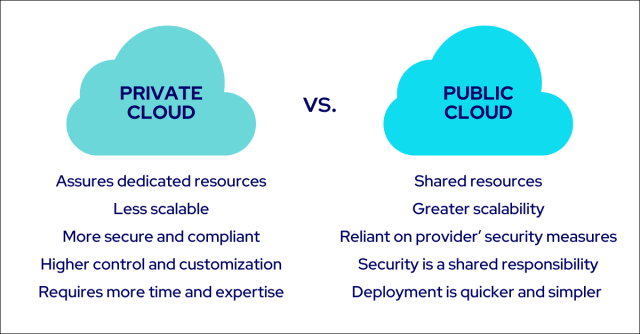
Now that we’ve explored private and public cloud, let’s compare the two, focusing on infrastructure, security, and deployment.
Infrastructure and scalability
While private cloud infrastructure assures dedicated resources, public cloud infrastructure presents scalable and shared resources.
Private cloud is generally less scalable than public cloud infrastructure due to its resource limitations, while public cloud infrastructure can access a wider range of resources, offering greater scalability.
Security and compliance
Security and compliance depend on the selected services, configuration, and division of responsibilities. Private cloud offers dedicated resources and options for customized controls. Public cloud provides security capabilities within provider-defined services. In either model, organizations must identify their responsibilities and verify that controls meet workload requirements.
Deployment and management
Private cloud deployment requires more time and expertise, as it involves advanced coding and engineering knowledge, in addition to a substantial initial investment in infrastructure and personnel.
On the other hand, public cloud deployment is quicker and simpler, as the provider assumes the costs of hardware and software and manages the infrastructure.
How to assess the right cloud option for your business

So, how do you decide which cloud option is right for your business? Consider factors such as:
- Business needs
- Security requirements
- Cost
Factors to consider
Factors such as scalability, security, and cost should be considered when choosing between private and public cloud. Private clouds usually necessitate a substantial initial investment yet can provide more cost savings in the long run, while public clouds are usually more economical in the short term but may not provide the same level of cost savings over time.
It is important to weigh the pros and cons of each option carefully before making a decision.
Cloud data governance requirements for CIOs
For CIOs, choosing between private and public cloud requires more than comparing security features. Cloud data governance defines how the organization classifies, accesses, protects, retains, and deletes its data, and who is accountable for those decisions.
Private cloud can provide greater flexibility to tailor infrastructure controls to internal policies. Public cloud offers provider-defined services and governance tools that organizations must configure and manage across their environments. With either model, the decision depends on whether your team and provider can implement policies consistently and demonstrate that controls work.
Use these requirements to compare private cloud providers and public cloud services:
| Governance requirement | Private cloud considerations | Public cloud considerations |
| Data location and residency | Evaluate where production data, backups, and recovery copies reside, including any provider-managed locations. | Verify location commitments for each selected service, including replication, backups, and cross-region transfers. |
| Access and accountability | Determine how administrators, internal teams, and hosting partners receive access, and who approves privileged activity. | Evaluate identity policies across accounts, subscriptions, and services to limit excessive permissions and maintain oversight. |
| Encryption and key management | Confirm available encryption controls and whether your organization or provider manages keys. | Verify key-management options for each service, including customer-managed keys where required. |
| Audit evidence and monitoring | Establish who collects logs, retains evidence, and supports audits across customer and provider responsibilities. | Confirm that required logs are enabled, retained, and accessible across the services supporting each workload. |
| Data retention and deletion | Define how retention policies, legal holds, and deletion apply to storage, backups, and retired infrastructure. | Check how service-specific retention, recovery, and deletion capabilities align with organizational policies. |
Hosted private cloud adds another consideration: the division of operational responsibilities. Dedicated infrastructure does not establish who manages operating systems, reviews access, monitors activity, or produces audit evidence. Ask providers to document those responsibilities in the service agreement.
Before selecting a model, identify the requirements each workload must meet, assign an owner to each control, and confirm how compliance will be demonstrated. This gives CIOs a practical basis for comparing cloud services against both governance obligations and internal staffing capacity.
Cost
Undeniably, cost plays a significant role in choosing between private and public cloud providers. Public cloud is generally more cost-effective than a private cloud, as the cloud provider assumes the costs of hardware and software.
However, the expense of operating a private cloud is contingent upon the magnitude and complexity of the private cloud resources and infrastructure, in addition to the cost of the hardware and software employed.
Hosted Private Cloud—A game changer
If you remain undecided, a hosted private cloud is a game changer that may be worth considering. It merges the benefits of a private cloud, like dedicated resources and superior security, with the scalability and cost efficiency of a public cloud.
Features and benefits
A hosted private cloud combines benefits from both private and public cloud, including dedicated resources, enhanced security, scalability, and cost-efficiency.
This allows organizations to enjoy the best of both worlds, meeting their unique requirements while capitalizing on the advantages of cloud computing.
Perfect for businesses and organizations
Businesses and organizations that need the control and security of a private cloud but desire the flexibility and cost-effectiveness of a public cloud would find hosted private cloud ideal. With hosted private cloud solutions like Flexential, organizations can leverage a comprehensive and flexible approach to building hybrid cloud solutions, combining the best of both private and public cloud environments.
Flexential Hosted Private Cloud
Flexential Hosted Private Cloud provides a comprehensive and adaptable approach to developing hybrid cloud solutions, integrating the benefits of both private and public cloud environments. Flexential Hosted Private Cloud offers the following benefits:
- Enhanced security
- Control
- Customization
- Cost savings
- Scalability
By leveraging the power of both private and public cloud environments, Flexential helps manage complex hybrid infrastructure to create a secure and flexible environment tailored to your business.
Summary
In conclusion, the choice between private and public cloud depends on your organization’s specific needs and requirements. Private cloud offers dedicated resources, enhanced security, and control, while public cloud provides scalability, cost savings, and ease of deployment. Hosted private cloud solutions, like Flexential, can be the perfect middle ground for businesses seeking the best of both worlds. By understanding the key differences and considering your business needs, you’ll be able to make a well-informed decision and harness the power of the cloud to propel your organization forward.